Kinan KVM Switches
4-Port KM Switch with Mouse Roaming Control, Independent Audio Switching
In stock Sold by Kinan Direct Fulfilled by Amazon Free shipping
Last price we saw on Amazon
$348.68
No score yet
We've only just started checking this product's price. Its Deal Score appears after a few more checks.
The price may have changed. We last checked it over 24 hours ago, so confirm it on Amazon.
Price checked Nov 17, 2026, 3:42 AM ET. Prices and availability can change.
We may earn a commission if you buy. It never changes the price you pay.
Product overview
Sold byKinan Direct
FulfilmentFulfilled by Amazon
ShippingFree shipping
BrandKinan
CategoryKVM Switches
Key features
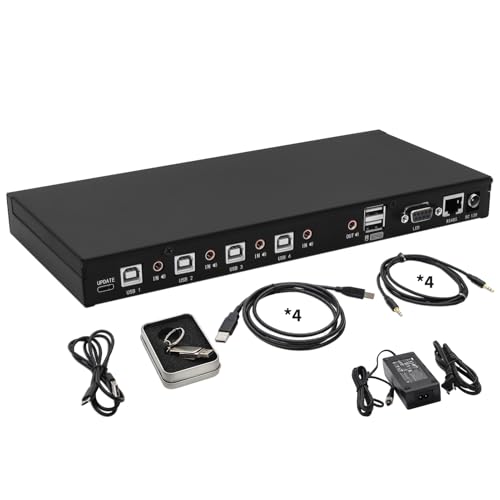
- Four-Port Keyboard and Mouse Switch: Effortlessly manage and switch KM (Keyboard and Mouse) functions across four computers, including multi-head setups, with the 4 Port KM Switch. This device supports seamless KM commands from a single workstation, streamlining your workflow without needing additional software. Simply use front panel push buttons or keyboard hotkeys for easy port selection.
- Mouse Roaming Function: Switch between computers seamlessly by moving the mouse cursor from one display to another. This intuitive mouse roaming feature allows for smooth transitions and enhanced control. You can also switch using front panel buttons or hotkeys.
- Customizable Monitor Layouts: Personalize your monitor layouts by connecting the KM switch to your computer via the included USB-C cable. Install the management software from the provided U-disk to customize the switching modes. This feature ensures an efficient and personalized setup, adapting to your specific workflow requirements.
- Independent Audio Switching: Experience superior audio quality with the stereo audio output and independent audio switching function. This allows you to listen to audio from one computer while controlling another, enhancing multitasking capabilities and providing a richer user experience. Advanced Features and Reliable Support: This KM switch supports hot-plugging, USB-C firmware upgrades, and RS485 communication management with a baud rate of 115200bps.
Show all 5 featuresShow fewer
- Multi-Head Display Setup Guide: By default, the KM switch operates in Single-Head Mode. To use computers with multiple displays, enable Multi-Head Mode (supports up to 3 displays per PC). For Windows Users: Double-click to install the multi-screen plugin patch(found on the provided USB flash drive) to enable Multi-Head Display support. Important: DO NOT add screens using the "Cross Screen" software. For Linux Users: Add screens directly via the "Cross Screen" software. No plugin is required.
Specifications
| Brand | Kinan |
|---|---|
| Color | Black |
| Hardware Interface | USB Type C |
| Special Feature | Surge Protection |
| Compatible Devices | Desktops, Laptops, Keyboards, Mice |
| Additional Features | Surge Protection |
| Total Usb Ports | 4 |
| Number of Ports | 4 |
| Operating System | Linux, Windows |
| Enclosure Material | Alloy Steel |
| Item Highlight | Hotkey Control, Includes Cables and Management Software to Customize Switching Modes |
| Manufacturer | Kinan |