Find any Amazon.com product's deals and best prices with our free Amazon deal finder and price tracker. Simply paste the product link (URL) or search by name in the box above. You'll get full product information, Deal Score, and all current deals. Shop smarter with the best Amazon deals finder in the USA.
x
Sorry, Something went wrong!
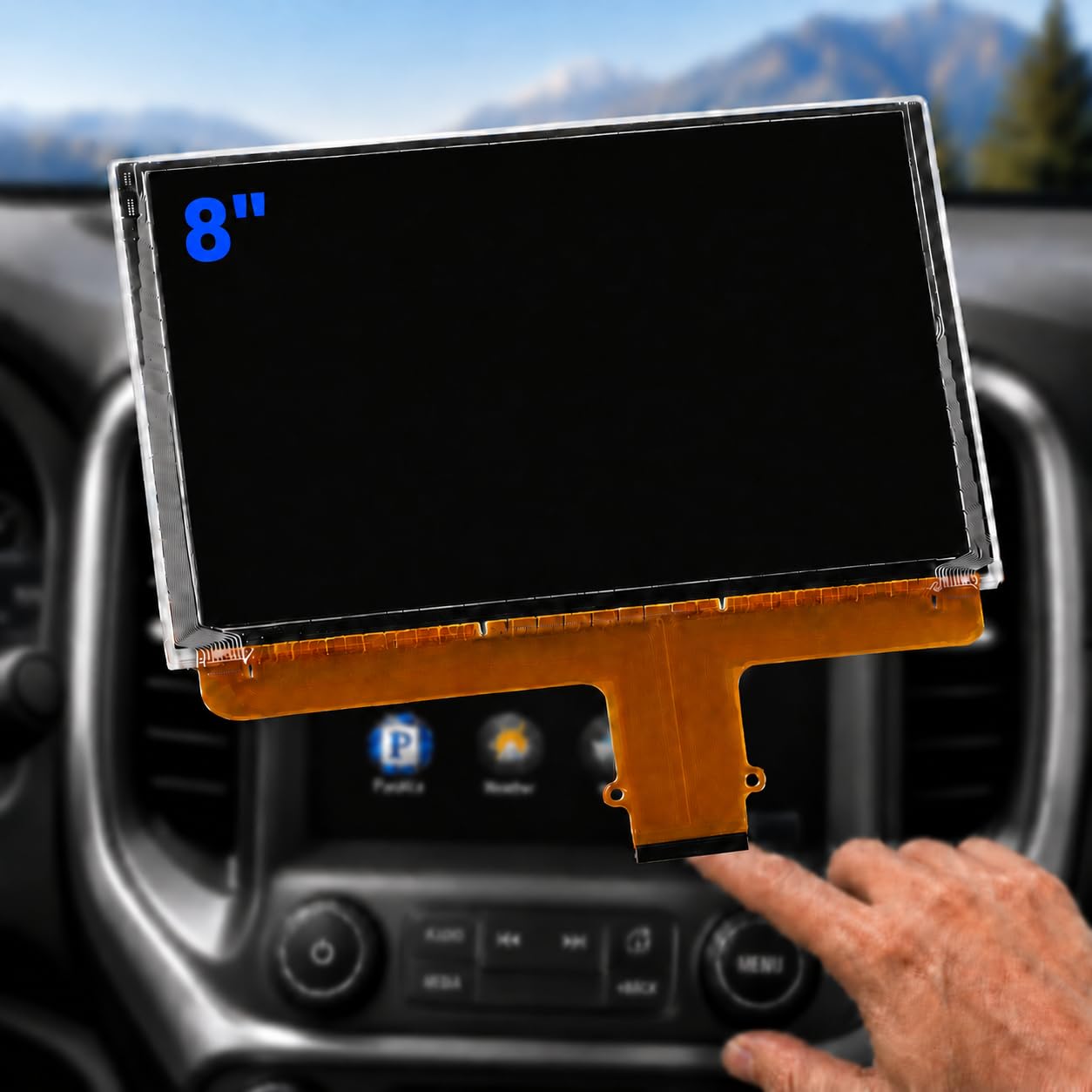
DJ080PA-01A 8-Inch LCD Touch Screen Replacement for Chevy and GMC
✅ In stock
F
Grade
🏷️ Price includes Coupon savings
⚠️ Price may have changed. Last updated 24+ hours ago — confirm on Amazon.
Check Deal at Amazon
Price verified Oct 16, 2026 3:11 AM · Prices & availability subject to change
Is This a Good Price on Amazon?
💤 Not a Deal- 💤Verdict: Not a Deal. Price is at or above historical norms. Best to wait for a sale.
- ➡️Pricing has held fairly steady, with no strong push in either direction.
How We Scored This Deal
Price Competitiveness
0/28
Recent Value
0/22
Market Standing
0/20
Deal Strength
0/20
Momentum
0/10
📝 Product Overview
🏪 Sold by
Yoneda AutoParts
📦 Fulfillment
Fulfilled by Amazon
🚚 Shipping
Free Shipping
Product Details
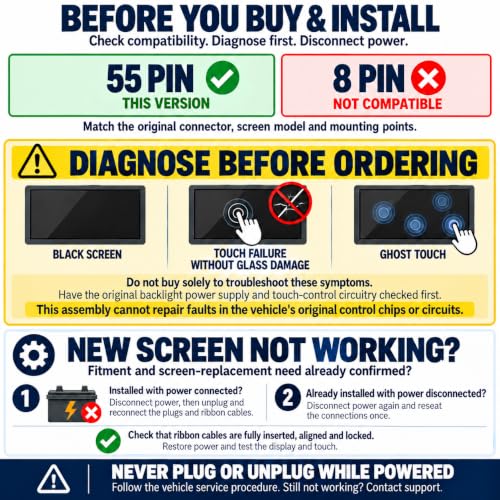
✓Diagnose Before Buying — If your original screen is black, has ghost touches, or stops responding without visible glass damage, have the fault diagnosed before ordering. This screen assembly cannot repair faults in the vehicle’s original touch-control chip, radio/HMI module or display/backlight power-supply circuits. Unsure about compatibility? Send photos of your original screen’s rear label and connectors to our support team.
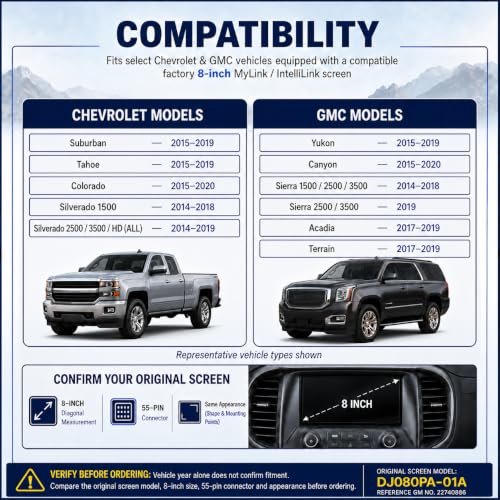
✓Compatible with Chevy Models – Fits Chevy Silverado 1500 2014-2018, Silverado 2500HD / 3500HD 2014-2019, Tahoe 2015-2019, Suburban 2015-2019 and Colorado 2015-2020.
✓Compatible with GMC Models – Fits GMC Sierra 1500/2500/3500 2014-2018, Sierra 2500/3500 2019, Yukon 2015-2019, Canyon 2015-2020, Acadia 2017-2019 and Terrain 2017-2019.
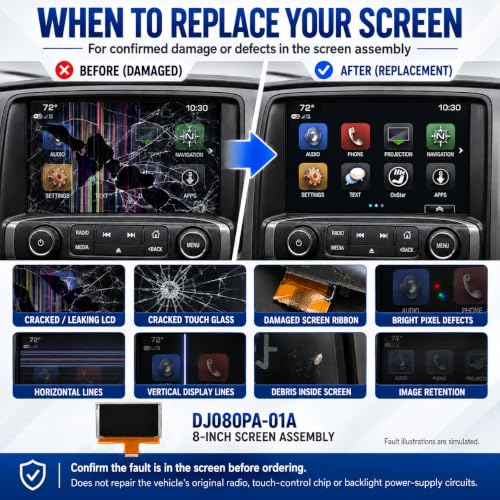
✓For Confirmed Screen Damage or Defects — Consider replacement for cracked LCD or touch glass, LCD leakage, damaged screen ribbon cables, fixed bright pixels, horizontal or vertical display lines, internal debris or persistent image retention. Confirm that the defect is within the screen assembly before purchasing; display symptoms alone do not identify the faulty component.
✓Replace the Screen, Keep the Factory System — Includes the LCD, touch panel and metal back housing as a preassembled screen replacement. Reuses the vehicle’s original radio, HMI module, touch-control chip, dashboard bezel and control panel; these parts are not included. Not a complete radio, navigation unit or 4.2-to-8-inch upgrade kit.
✓Verify Your Original Screen — Check the DJ080PA-01A model identification and GM reference number 22740886, then compare the 8-inch size, 55-pin touch connector and rear mounting layout with the listing images. Part numbers alone do not confirm compatibility. This version is not compatible with the 8-pin touch connector.
✓Installation & Troubleshooting — Professional installation recommended. Disconnect power per vehicle service instructions before plugging or unplugging. Fully seat and lock ribbon cables; do not pinch cables or force the screen into place. If the screen stays black or touch fails, disconnect power and reseat all connections once, even if first installed with power off. Restore power and test before refitting trim. If issues persist, contact support.
⚙️ Specifications
Brand
YONEDA
Model Name
DJ080PA-01A LCD Touch Screen Assembly
Vehicle Service Type
2014-2018 Chevrolet Silverado 1500, 2014-2018 GMC Sierra 1500/2500/3500, 2014-2019 Chevrolet Silverado 2500HD/3500HD, 2015-2019 Chevrolet Tahoe/Suburban, 2015-2019 GMC Yukon, 2015-2020 Chevrolet Colorado, 2015-2020 GMC Canyon, 2017-2019 GMC Acadia/Terrain, 2019 GMC Sierra 2500/3500
Screen Size
8 inches
Special Feature
LCD Display, Touchscreen
Connectivity Technology
55-Pin
Map Type
No Map Included
Included Components
8-Inch LCD Touch Screen Assembly
Mounting Type
In-Dash
Product Dimensions
7.5"L x 0.59"W x 4.72"H
Compatible with Vehicle Type
2014-2018 Chevrolet Silverado 1500, 2014-2018 GMC Sierra 1500/2500/3500, 2014-2019 Chevrolet Silverado 2500HD/3500HD, 2015-2019 Chevrolet Tahoe/Suburban, 2015-2019 GMC Yukon, 2015-2020 Chevrolet Colorado, 2015-2020 GMC Canyon, 2017-2019 GMC Acadia/Terrain, 2019 GMC Sierra 2500/3500