ConnBull VGA Cables
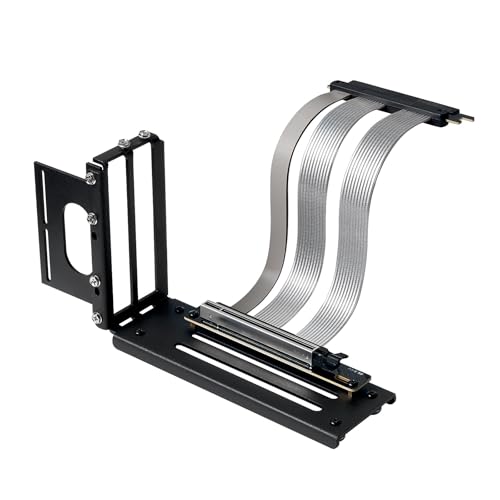
PCIE 5.0 Riser Cable with 3 Slots Vertical GPU Mount Bracket Kit, Gen 5 GPU Graphics Card Extension Cable, PCI-E 16X 128GB/s Compatible with PCIE 4.0 and WRX80/ 90E, RTX4090/ 5090/ RX7900XTX, 200mm
In stock
Price on Amazon
Check today's price on Amazon
No score yet
We've only just started checking this product's price. Its Deal Score appears after a few more checks.
We may earn a commission if you buy. It never changes the price you pay.
Product overview
BrandConnBull
CategoryVGA Cables
Key features
- It will need at least 6 slots' space to install this GPU vertical Mount bracket, before you order this Kit, It is recommended to check the space inside your PC case, it is also recommended to use Water-cooled radiator so as to avoid the vertically install GPU conflicts with the Air-cooled radiator
- The extension cable without a bracket may encounter problems such as mismatch with some computer cases and installation difficulties. We provide matching brackets to solve similar problems encountered by many customers, and we provide a complete and detailed installation video in the product details. The installation process is simple and easy to operate
- Future Proof for Gen 5 GPU: This Graphics Card extender cable compatibility with current and future GPUs like RTX4090, RX7900XTX. Suitable for diverse applications, including PC chassis, AI apps, servers, extreme gaming, tight space ITX, and water-cooled systems
- Fully replaces PCI-E Gen 4 and Gen 3 riser cable: This Graphics Card Extension Cable enabling vertical GPU display to showcase your hardware without sacrificing Gen 5 performance. Improves air circulation, prolongs GPU lifespan, and accommodates a wide range of GPUs. Ideal for users seeking better aesthetics and efficient cooling
Show all 6 featuresShow fewer
- Premium wires with extreme shielding ensure high performance: Compatible with other Gen 5 devices, such as M.2 SSDs, providing versatility and expandability. 29AWG wire specification, Transmission speed depends on GPU model
- Please also check if there are ribs between the PCIE slots at the back side of the case, those cases with ribs will block the DP/HDMI cable to plug onto GPU, you may need to cut it off a little bit
Specifications
| Brand | ConnBull |
|---|---|
| Connector Type | USB Type C |
| Cable Type | Coaxial |
| Compatible Devices | Desktop Computer, Server |
| Special Feature | Data Transfer |
| Other Special Features of the Product | Data Transfer |
| Connector Gender | Male-to-Female |
| Data Transfer Rate | 128 Gigabytes Per Second |
| Number of Pins | 16 |
| Frequency | 16 GHz |