Find any Amazon.com product's deals and best prices with our free Amazon deal finder and price tracker. Simply paste the product link (URL) or search by name in the box above. You'll get full product information, Deal Score, and all current deals. Shop smarter with the best Amazon deals finder in the USA.
x
Sorry, Something went wrong!

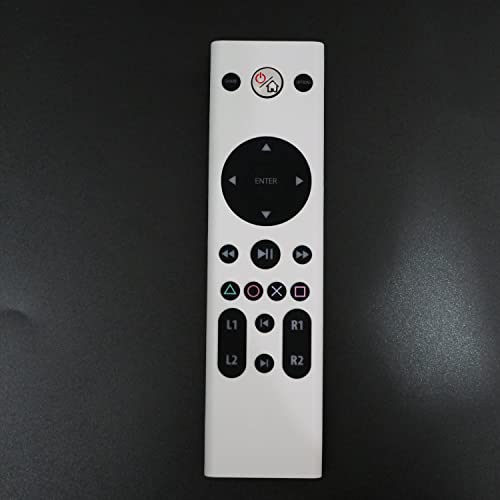
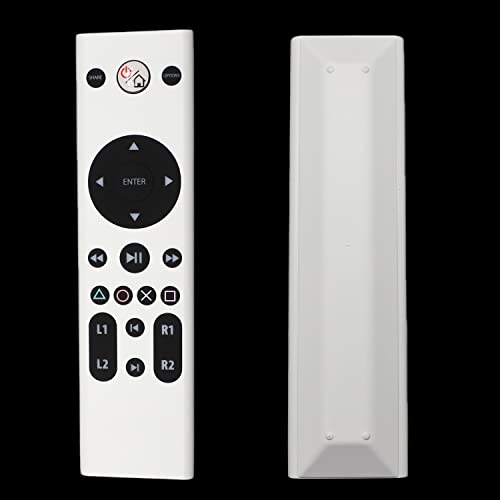
Replacement for PlayStation Media Remote Control, Compatible with PlayStation 4 (PS4) - White Color
✅ In stock
⭐ Lowest price we've tracked
F
Grade
Analysis Confidence
59%
⚠️ Price may have changed. Last updated 24+ hours ago — confirm on Amazon.
Check Deal at Amazon
Price verified Feb 26, 2026 4:40 AM · Prices & availability subject to change
Is This a Good Price on Amazon?
💤 Not a Deal- 💤Verdict: Not a Deal. Price is at or above historical norms. Best to wait for a sale.
- 🏷️A 20% cut from the official retail price adds further appeal.
- 📉Our analysis places this at the most competitive price point we have ever tracked for this product — an exceptional moment to buy.
- ➡️Pricing has held fairly steady, with no strong push in either direction.
How We Scored This Deal
Price Competitiveness
0/28
Recent Value
0/22
Market Standing
0/20
Deal Strength
20/20
Momentum
4/10
📝 Product Overview
🏪 Sold by
Value Foremost
📦 Fulfillment
Fulfilled by Amazon
🚚 Shipping
Free Shipping
Product Details
✓Media Remote Control Compatible with Playstation 4 (PS4). It does NOT fully support PS5, which may disconnected from PS5.
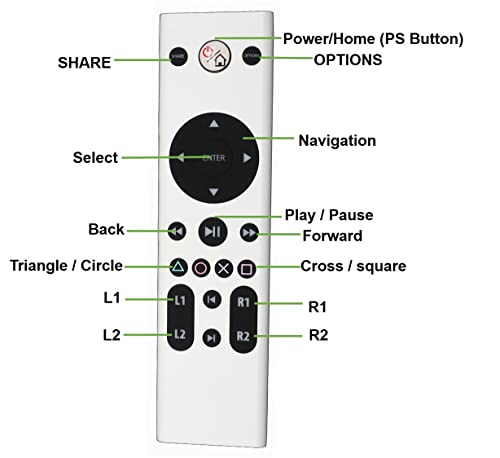
✓Simplify navigate media with built-in play/pause, fast forward and fast reverse buttons.
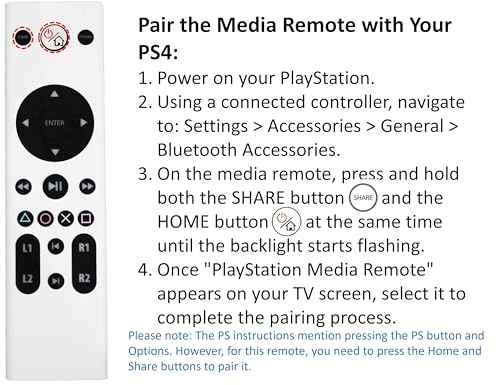
✓First, pair this remote with your PlayStation (PS4), and then it will be able to control your PlayStation devices.
✓Pair the Media Remote with Your PS4: (1) Power on your PS. (2) Using a connected controller, navigate to: Settings > Accessories > General > Bluetooth Accessories. (3) On the media remote, press and hold both the SHARE button and the HOME button at the same time until the backlight starts flashing. (4) Once "PlayStation Media Remote" appears on your TV screen, select it to complete the pairing process.
✓Dedicated PlayStation buttons: Action buttons, Share, Options, triangle, circle, square, cross, L1, L2, R1, R2.
✓Access all essential controls with a sleek and Compact design.
✓If the remote disconnects from your PS. To reconnect it, please follow the pairing instructions to re-establish the connection.
⚙️ Specifications
Brand
UBay
Special Feature
Ergonomic
Color
White
Max Number of Supported Devices
1
Compatible Devices
Television
Package Dimensions
6.18 x 1.93 x 0.79 inches
Item Weight
2.08 ounces
ASIN
B09ZQ1NDQK
Item model number
62f0e9d4-a6f3-4c32-bf7e-b541980998c7
Customer Reviews
2.9 2.9 out of 5 stars (103) var dpAcrHasRegisteredArcLinkClickAction; P.when('A', 'ready').execute(function(A) { if (dpAcrHasRegisteredArcLinkClickAction !== true) { dpAcrHasRegisteredArcLinkClickAction = true; A.declarative( 'acrLink-click-metrics', 'click', { "allowLinkDefault": true }, function (event) { if (window.ue) { ue.count("acrLinkClickCount", (ue.count("acrLinkClickCount") || 0) + 1); } } ); } }); P.when('A', 'cf').execute(function(A) { A.declarative('acrStarsLink-click-metrics', 'click', { "allowLinkDefault" : true }, function(event){ if(window.ue) { ue.count("acrStarsLinkWithPopoverClickCount", (ue.count("acrStarsLinkWithPopoverClickCount") || 0) + 1); } }); }); 2.9 out of 5 stars
Best Sellers Rank
#33,648 in Video Games (See Top 100 in Video Games) #106 in PlayStation 4 Thumb Grips