Find any Amazon.com product's deals and best prices. Simply paste the product link (URL) or search by name in the box above. You'll get full product information, Deal Score, and all current deals. Shop smarter with the best Amazon deals finder in the USA.
x
Sorry, Something went wrong!

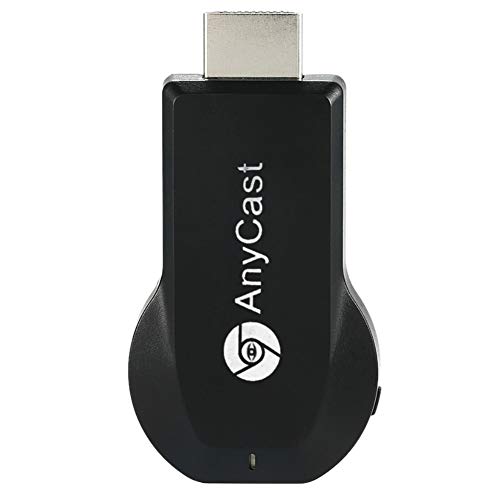

SmartSee Anycast HD Wireless Display Adapter WiFi 1080P Mobile Screen Mirroring Receiver Dongle for iPhone Mac iOS Android to TV Projector Support Miracast Airplay DLNA
F
Price verified Jun 25, 2026 12:04 PM · Prices & availability subject to change
No Amazon Prime?
Unlock free shipping & Prime Video — try free
No commitment · Cancel anytime before trial ends
💡 Deal Insight
💤 Not a Deal
Pricing has held fairly steady, with no strong push in either direction. Price is at or above historical norms. Best to wait for a sale.
How We Scored This Deal
Price Competitiveness
0/28
Recent Value
0/22
Market Standing
0/20
Deal Strength
0/20
Momentum
0/10
📝 Product Overview
Sold by
SmartSee-US
Fulfillment
Fulfilled by Amazon
Shipping
Free Shipping Available
Product Details
- 1080P Wireless display: SmartSee Wireless display adapter can mirror the screen of phone, tablet, laptop, pc to your TV/projector/monitor wirelessly. Share photos, movies(unencrypted only), files to a big screen easily, up to 1080P resolution. What shows on your phone, tablet, laptop, pc can show up on another big display. Cast a small screen to a large one. Make your TV a smart TV.
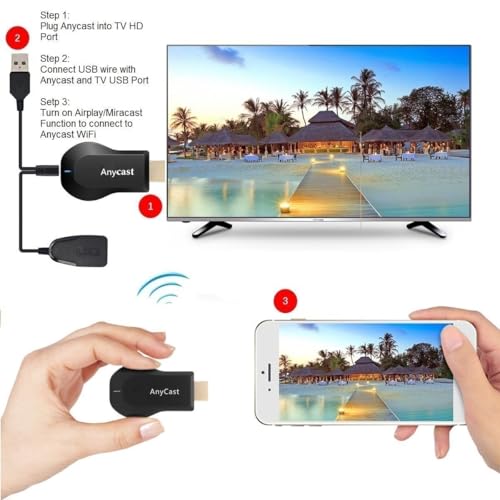
- Easy to use: No App or drivers required. 3 steps to enjoy media on large screen: Plug->Connect->Mirroring: Plug the dongle into the HD port of your TV, projector, or monitor>Power it using the included USB WiFi antenna>Switch your TV to the correct HD channel. The Anycast UI will show up, recognize your IP address and match your local language automatically. > Connect your device with the Anycast dongle. Connection steps differ by systems, follow the User Manual based on your device type.
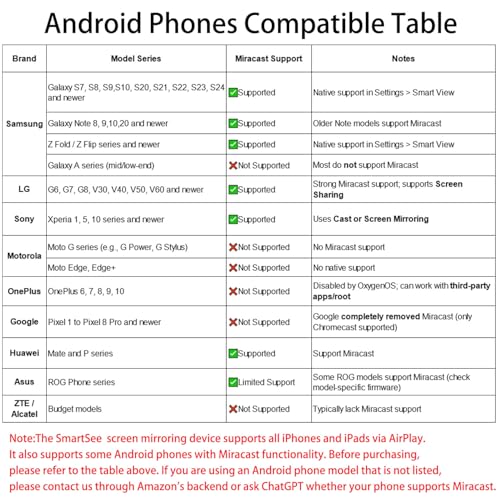
- Compatibility(Multi-Platform Support) and Limitation: Support Macbook series, iOS 9.0+, Android 5.0+, Windows 10 devices through Airplay, Miracast, DLNA. Notes: 1. NOT supports for Google Pixel or Motorola. 2. Android and Windows devices must support Miracast for screen mirroring to work. 3. Not compatible with the encrypted apps, such as Netflix/ Amazon Video/ HBO go/ Hulu Plus sky go/DIRECTV etc.
- Wide Usage Scenarios (Professional & Everyday Use): Business & Office-Mirroring screen to projector, share PPT, mail, documents and other content wirelessly. Education & Training-Mirroring screen to big screen, share teaching content, classroom teaching, live demos, and workshops wirelessly. Home Entertainment- Watch with your family at home. Mirroring screen to TV, share photos, movies(unencrypted only) wirelessly. Travel & Mobile Work- Carry it while travelling, share your phone to TV anytime. Retail & Exhibitions-Product demos, promotional files, and catalogs. etc.
- Usage Notes & Practical Tips: Anycast dongle is built-in 2 Modes-AirPlay Mode: For all iOS devices; Miracast Mode: For Android and Windows devices. A built-in mode switch button allows switching between AirPlay Mode (iOS) and Miracast Mode (Android & Windows) to match your device system. Press and hold the button for 3-5 seconds to restart the dongle(resolves most connection issues). Note: Always ensure the display is set to the correct HD input. Detailed connection please check the detailed description below or the User Manual according to your device system.
- Regular OTA Update: This adapter supports automatic OTA (Over-The-Air) firmware updates directly from the cloud. Once connected to WiFi, the dongle upgrades itself to ensure ongoing compatibility with the latest iOS, Android, and Windows versions.
⚙️ Specifications
Brand
SmartSee
Connectivity Technology
Wireless
Connector Type
HD
Special Feature
Airplay, DLNA, Miracast
Resolution
1080p
Supported Internet Services
Browser, Skype, YouTube
Controller Type
Wireless
Form Factor
TV Stick
Color
Black
Model Name
STCD0073JP
Other Special Features of the Product
Airplay, DLNA, Miracast
$19.98
Check Deal →