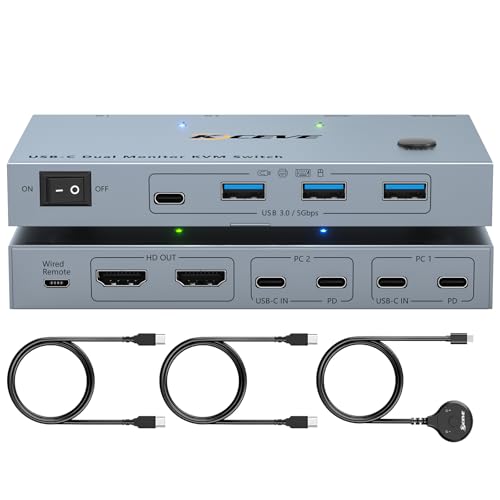
NAWEN KVM Switches
USB C KVM Switch 2 Monitors 2 Laptops, 4K@60Hz USB C Dual Monitor KVM Switch for 2 laptops to Share 2 Monitor and 4 USB3.0 Devices, 80W PD Charging, Wired Remote and Cables Included
In stock
Price on Amazon
Check today's price on Amazon
No score yet
We've only just started checking this product's price. Its Deal Score appears after a few more checks.
We may earn a commission if you buy. It never changes the price you pay.
Product overview
BrandNAWEN
CategoryKVM Switches
Key features
- 【KVM Switch 2 Monitors 2 Laptops USB-C 】This USB C KVM switch allows 2 laptops share 2 monitors and 4 USB devices, such as keyboard, mouse, printer and so on. Each laptop only needs a single USB C input cable, eliminating clutter on your desk. 🚩Note: Mac OS can’t output extended dual screens.
- 【Support 80W PD Fast Charging】USB C KVM Switch dual monitors is designed with a 80W PD charging port, which can provide enough power for your laptop during use and eliminates the hassle of occupied USB-C charging ports!---Meanwhile can ensure the unit works more stably.
- 【5Gbps Ultra-fast Transfer】USB 3.0 KVM switch 2 laptops 2 monitors transfer files in Seconds. KVM switch equipped with 4 USB 3.0 ports (3 USB-A Ports +1 USB-C Port) for 2 laptops to share USB devices such as keyboard, mouse, printer, etc., speed up to 5Gbps for data transfer.
- 【Ultra HD 4K Visual Effect】Dual Monitor KVM switch with usb c supports up to 4K@60Hz, 2K@144Hz /120Hz resolutions and is backward compatible. Provides a visual treat. Note: the resolution supported by this output depends on your laptops, monitors and USB Type-C cables.
Show all 5 featuresShow fewer
- 【Multiple Display Mode】Windows system dual monitors support MST (multi-stream transport) mode and SST mode. The MacOS (M1, M2) system ONLY supports SST mode, doesn’t support MST mode. You can press “Windows”and “P” key to chose which modes you want. Attention: Both monitor can only show content from single computer once.
Specifications
| Operation Mode | ON-NONE-ON |
|---|---|
| Current Rating | 1 Amps |
| Operating Voltage | 5 Volts |
| Contact Type | Normally Closed |
| Connector Type | Plug In |
| Brand | NAWEN |
| Switch Type | DIP Switch |
| Terminal | Solder |
| Material | Metal |
| Item dimensions L x W x H | 3.94 x 2.76 x 0.79 inches |
| Circuit Type | 1-way |
| Mounting Type | PCB Mount |