Find any Amazon.com product's deals and best prices with our free Amazon deal finder and price tracker. Simply paste the product link (URL) or search by name in the box above. You'll get full product information, Deal Score, and all current deals. Shop smarter with the best Amazon deals finder in the USA.
x
Sorry, Something went wrong!
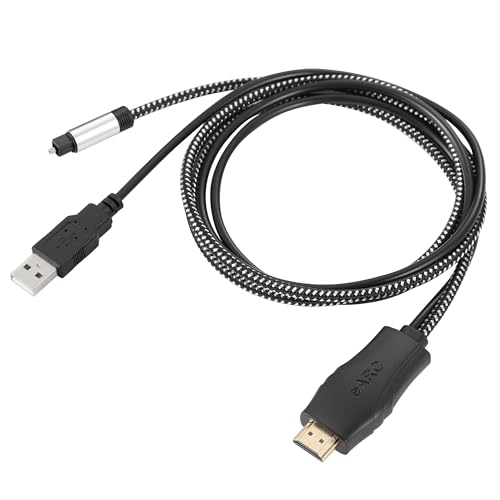
192KHz HDMI eARC/ARC to Optical Audio Converter for TV to Soundbar
✅ In stock
F
Grade
⚠️ Price may have changed. Last updated 24+ hours ago — confirm on Amazon.
Check Deal at Amazon
Price verified Sep 22, 2026 7:53 PM · Prices & availability subject to change
Is This a Good Price on Amazon?
💤 Not a Deal- 💤Verdict: Not a Deal. Price is at or above historical norms. Best to wait for a sale.
- ➡️Pricing has held fairly steady, with no strong push in either direction.
How We Scored This Deal
Price Competitiveness
0/28
Recent Value
0/22
Market Standing
0/20
Deal Strength
0/20
Momentum
0/10
📝 Product Overview
🏪 Sold by
Unstincer US
📦 Fulfillment
Fulfilled by Amazon
🚚 Shipping
Free Shipping
Product Details
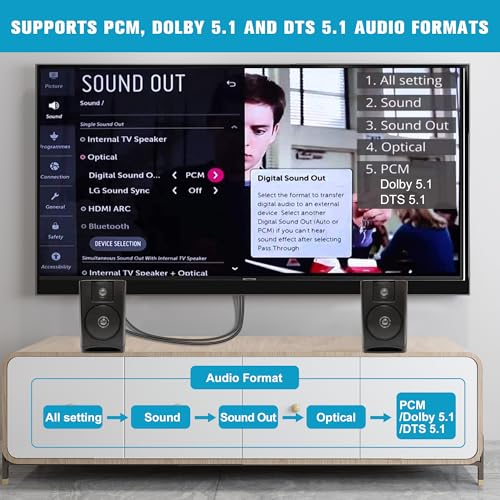
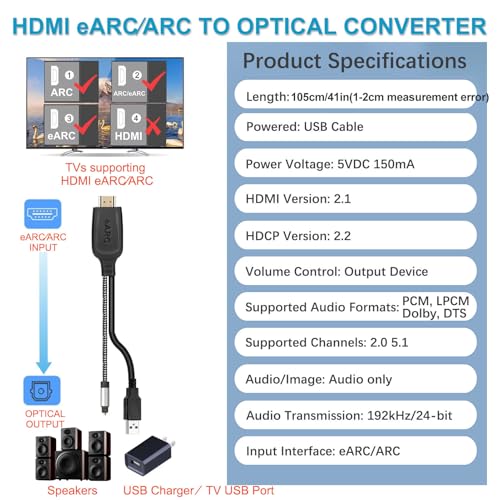
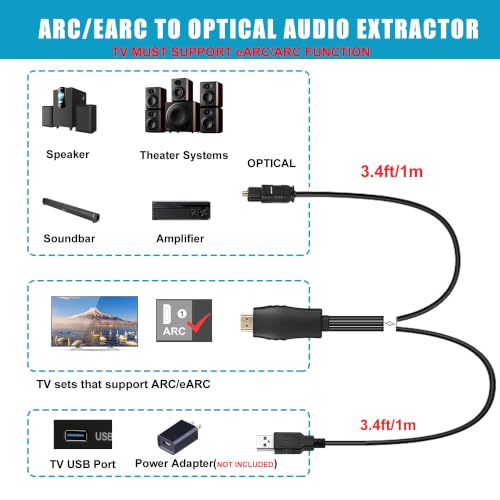
✓HDMI eARC to Optical Cable(1.05m/41in): The eARC Audio Extractor connects to an eARC or ARC-compatible TV, allowing the TV's audio to be transmitted to a sound system via the converter's built-in optical SPDIF digital audio cable. The eARC audio converter Only for TV with “eARC” or ''ARC'' interface. Please make sure your TV supports the ARC feature and set the audio output to “ARC/EARC” and set the audio format to PCM
✓Plug and Play: This eARC/ARC audio converter eliminates the need for additional cables or conventers, and serves as a bridge between the TV and sound system. Plug-and-Play. Easy to install and use. It is ideal for home theaters, meeting, conference rooms, and other settings.【Length Confirmation: This cable is 3 ft (approx. 41 inches) long. Please measure the distance between your TV and audio equipment.】
✓Clear Sound Quality: Supports 24-bit/192kHz audio sampling rate. Ensures pure sound quality. Make the eARC Audio Connector a convenient option for your home entertainment by seamlessly connecting your TV to your soundbar
✓Audio Formats Setting: Compatible with multiple audio Formats. Set the TV Audio Formats to PCM, Dolby 5.1 or DTS 5.1. Bringing you high-quality audio for an immersive entertainment experience. If using Dolby 5.1 or DTS 5.1 audio formats, the sound system also need support Dolby Audio or DTS
✓Note: The optical connections do NOT support CEC volume control. Please adjust volume directly on your soundbar. Connect the eARC/ARC audio converter's USB cable to your TV's USB port or another USB-compatible port. LED indicator will lights up when HD interface is connected. Using eARC/ARC Audio Adapter Setting up the TV(1.Insert the HD plug of the eARC/ARC Audio Converter into the TV's eARC or ARC interface of the TV set. 2. Set the TV's audio output to ARC or eARC 3.Set Audio Format to PCM. 4.Turn on CEC 4.Refer to the TV's user manual for setup
⚙️ Specifications
Brand
Unstincer
Connector Type
Earc/Arc
Cable Type
Optical
Compatible Devices
ARC TV, Speaker
Special Feature
Plug and Play
Other Special Features of the Product
Plug and Play
Connector Gender
Male-to-Male
Number of Pins
20
Frequency
192 KHz