Find any Amazon.com product's deals and best prices with our free Amazon deal finder and price tracker. Simply paste the product link (URL) or search by name in the box above. You'll get full product information, Deal Score, and all current deals. Shop smarter with the best Amazon deals finder in the USA.
x
Sorry, Something went wrong!


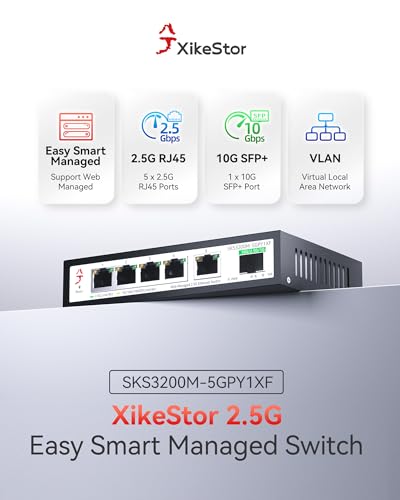
6-Port 2.5G Web Managed Ethernet Switch with 10G SFP+ Uplink, 2.5 Gigabit Network Switch, Ethernet Splitter, Plug & Play, Metal Housing, Desktop/Wall-Mount
✅ In stock
F
Grade
Analysis Confidence
100%
⚠️ Price may have changed. Last updated 24+ hours ago — confirm on Amazon.
Check Deal at Amazon
Price verified Oct 4, 2026 11:29 PM · Prices & availability subject to change
Is This a Good Price on Amazon?
💤 Not a Deal- 💤Verdict: Not a Deal. Price is at or above historical norms. Best to wait for a sale.
- 💰The current price is slightly above the going rate for this product — worth watching for a drop.
- 🏷️The retail sticker price has been slashed by 84% — a steep markdown from the official listing.
- 📉Going back roughly eight months, a more competitive price has not appeared — this stands out as a strong value by recent standards.
- ➡️Pricing has held fairly steady, with no strong push in either direction.
How We Scored This Deal
Price Competitiveness
0/28
Recent Value
0/22
Market Standing
2.89/20
Deal Strength
13/20
Momentum
4/10
📝 Product Overview
🏪 Sold by
Xike Digital Store
📦 Fulfillment
Fulfilled by Amazon
🚚 Shipping
Free Shipping
Product Details
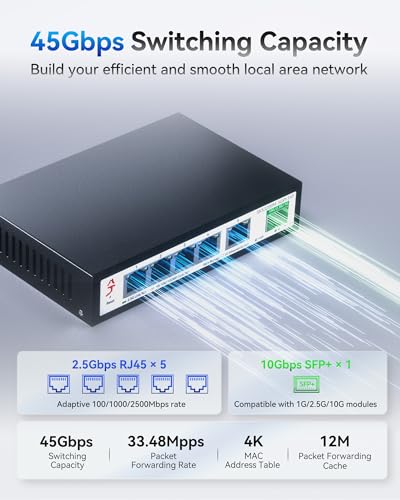
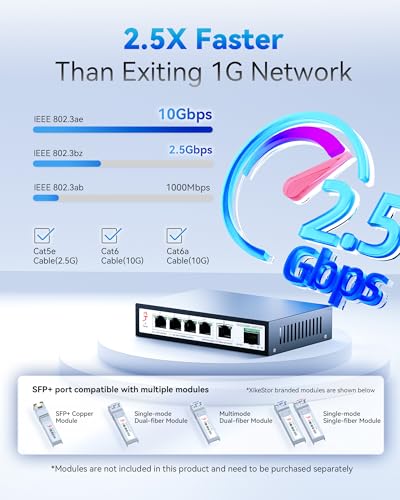
✓Versatile High-Speed Connectivity: This 6 port 2.5g managed switch features 5 adaptive 2.5G RJ45 ports supporting 100M/1G/2.5G and 1 versatile SFP+ port that supports 1G/2.5G/10G. The 10g switch SFP+ port in this sfp network switch is compatible with various modules, DAC, and AOC cables, ensuring seamless connection with diverse devices.
✓Advanced L2 Management Functions: Equipped with a user-friendly web management interface, this 2.5gb web managed switch offers essential L2 management features, including VLAN configuration(The number of VLANs is capped at a maximum of 32), QoS data prioritization, link aggregation (both static and LACP), loop settings, IGMP snooping, and bandwidth control. Note: Dynamic aggregation on this 6 port managed switch requires downloading the latest V1.9 firmware from the official website.
✓Stable High-Speed Transmission: All ports in this 2.5 gigabit managed network switch support full line-rate, non-blocking switching with automatic port flipping, providing robust bandwidth handling capabilities. This ensures low forwarding delay and minimizes packet loss for a reliable computer networking switch experience.
✓Durable and Silent Operation: Designed with a metal casing and side ventilation holes for enhanced heat dissipation, this 2.5g web managed switch ensures stable operation and extended lifespan. The fanless design of this 2.5 gb switch ensures noise-free operation, making it suitable for desktop use or wall-mounted installations at home or in the office.
✓Wide Application Range: Ideal for connecting various devices, such as 2.5G WiFi 6 APs, 2.5G NAS, 4K video streaming devices, gaming PCs, 2.5G servers, 2.5G PCIe adapters, printers, network cameras, and gaming consoles. This 2.5gbe switch is especially beneficial for NAS and servers with link aggregation support to increase bandwidth and achieve load balancing. Perfect for use in school dormitories, SOHO environments, homes, and small businesses. Additionally, this network hub features 6KV lightning protection and 8KV static protection, enhancing network stability during adverse weather conditions.
✓Easy Management Access: To access the management interface of the switch, first change your network's IP address to 192.168.10.X (where X is any number between 2 and 254, excluding 12). Then, open a web browser and enter 192.168.10.12. You can log in using the default username and password(located on the bottom of the product). After configuring settings, remember to click "Save Configuration" button under Tools to ensure settings are retained; otherwise, the switch will revert to factory settings if powered off or upgraded.
⚙️ Specifications
Brand
XikeStor
Number of Ports
6
Included Components
Adhesive Rubber Feet, Ethernet Switch*1, Power Adapter*1, User Manual*1, Warranty Card*1
Color
black
Compatible Devices
Desktop
Product Dimensions
5.5"L x 3.7"W x 1.1"H
Item Weight
12.32 ounces
Voltage
12 volts
Case Material
Metal
Upper Temperature Rating
55 Degrees Celsius
Interface Type
RJ45, SFP+


