Find any Amazon.com product's deals and best prices with our free Amazon deal finder and price tracker. Simply paste the product link (URL) or search by name in the box above. You'll get full product information, Deal Score, and all current deals. Shop smarter with the best Amazon deals finder in the USA.
x
Sorry, Something went wrong!
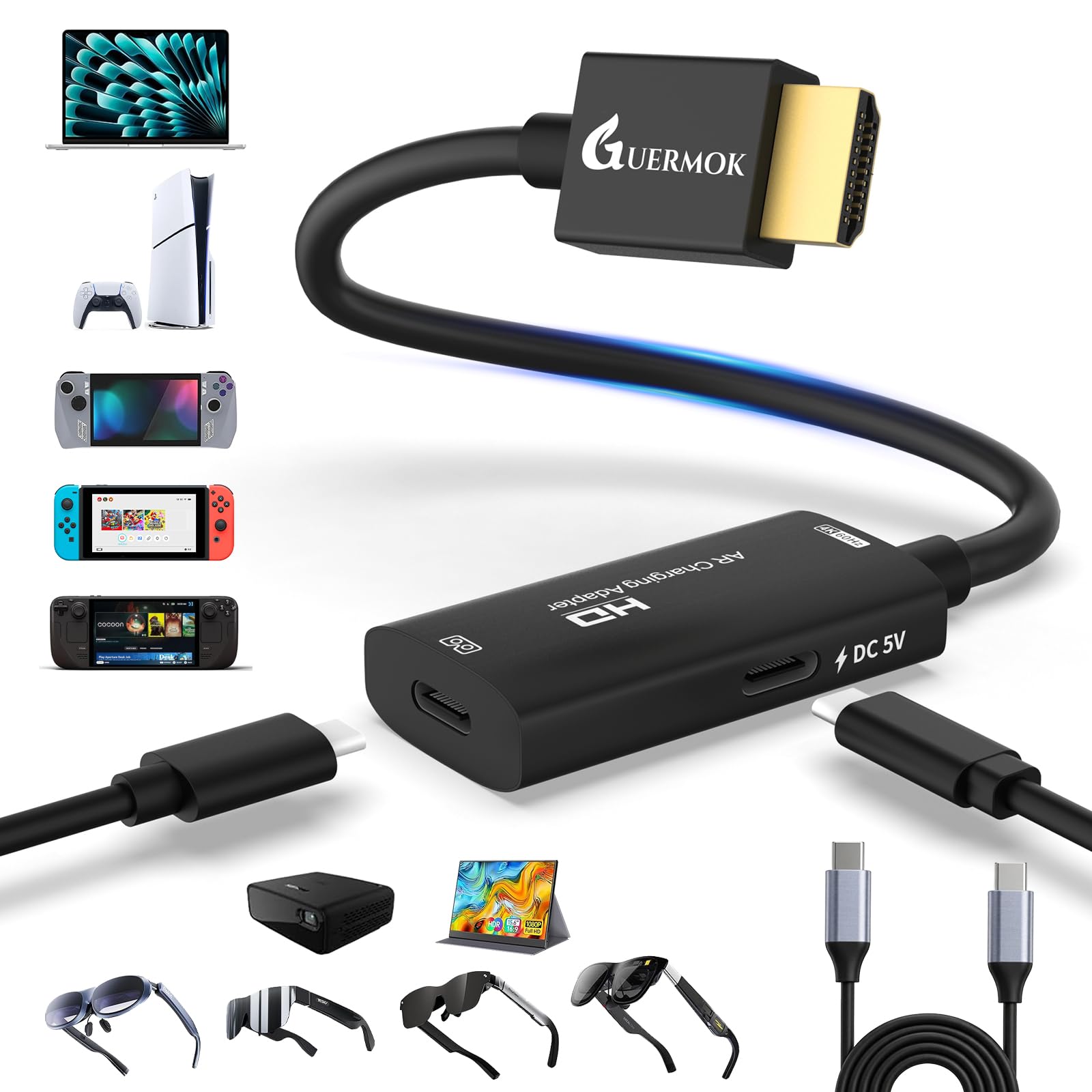


Guermok HDMI to USB C Video Display Adapter, 4.9ft AR Glasses Hub, 4K@60Hz
✅ In stock
F
Grade
Analysis Confidence
100%
⚠️ Price may have changed. Last updated 24+ hours ago — confirm on Amazon.
Check Deal at Amazon
Price verified Sep 2, 2026 11:18 AM · Prices & availability subject to change
Is This a Good Price on Amazon?
💤 Not a Deal- 💤Verdict: Not a Deal. Price is at or above historical norms. Best to wait for a sale.
- 💰The current price is slightly above the going rate for this product — worth watching for a drop.
- 📉It has been quite a while since a more competitive price was available, lending today's offer solid comparative value.
- ➡️Pricing has held fairly steady, with no strong push in either direction.
How We Scored This Deal
Price Competitiveness
0/28
Recent Value
0/22
Market Standing
0/20
Deal Strength
0/20
Momentum
4/10
📝 Product Overview
🏪 Sold by
MokTok
📦 Fulfillment
Fulfilled by Amazon
🚚 Shipping
Free Shipping
Product Details
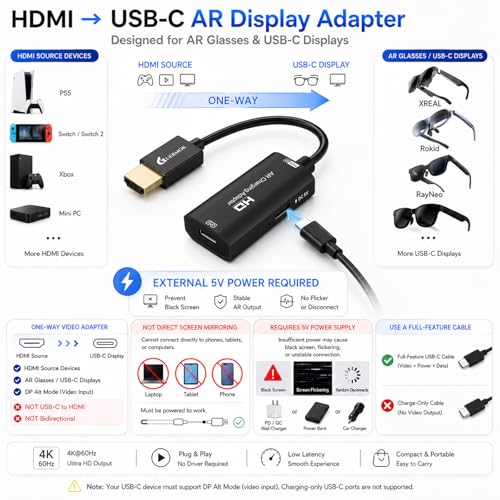
✓【4K@60Hz & 1080P@120Hz with Full-Function USB-C Cable】Supports up to 4K@60Hz and 1080P@120Hz on compatible AR glasses and USB-C displays. This HDMI to USB-C Display Converter connects HDMI source devices directly to a USB-C display for movies, gaming and screen mirroring. Includes a 1 m (3.3 ft) full-function USB-C video cable for an easy and flexible connection. Ensure the connected display supports USB-C video and audio input. If audio is unavailable on certain AR glasses, switch the glasses to DisplayPort (DP) audio mode according to the glasses operating instructions
✓【Wide AR Glasses Compatibility, Portable & Low Latency】This AR Glasses Adapter works with XREAL One/One Pro, XREAL Air/Air 2/Air 2 Pro, RayNeo Air series, Rokid Max and other AR glasses that accept USB-C video and audio input. Also supports compatible USB-C portable monitors and projectors. The compact, travel-friendly design delivers low-latency video output for AR gaming, movies, mobile setups, presentations and business use. Studio display may display video without audio through this adapter; use an external audio device when necessary
✓【Wide HDMI Source Compatibility】Connect this HDMI to USB C Adapter to Switch 2/1, Steam or ROG via a dock with HDMI output, or directly to PS5/4, Xbox Series X/S, desktop PCs, laptops, media players and other HDMI sources. Switch 2/1, Steam and ROG cannot connect directly through their USB-C ports. The HDMI device is the video source, while AR glasses, a portable monitor or projector is the USB-C display. The USB-C end is for display output only and cannot connect to a computer as the video source. If audio is unavailable, select HDMI audio output on the source device and confirm that the display supports audio input
✓【One-Way HDMI Source to USB-C Display】Not Bidirectional. Designed to transmit video from an HDMI source to AR glasses or a USB-C display that accepts video input. HDMI is the source side and USB-C is the display side; USB-C to HDMI conversion and signal transmission in the opposite direction are not supported. This is a hardware video converter and does not use DisplayLink technology, drivers or software. It cannot turn a laptop, tablet or phone into a receiving display or work as a video capture card. Please confirm the connection direction and video capabilities of your devices before setup
✓【Required 5V Power & Efficient Heat Dissipation】Connect the 5V power port to a 5V 1–1.5A power source for stable operation. Do not use any power source above 5V or multi-port fast chargers, as excessive voltage may permanently damage the adapter. Without external power, the HDMI to USB-C Display Converter will not output a video signal; insufficient power may cause flickering, disconnection or a black screen. The aluminum alloy housing helps dissipate heat during extended use, and slight warmth is normal. Package includes: 1× 1.5 m (4.9 ft) HDMI to USB-C adapter, 1× 1 m (3.3 ft) full-function USB-C video cable and 1× user manual
⚙️ Specifications
Compatible Devices
Portable Monitor、AR glasses、XREAL:XREAL Air 2 Pro、XREAL One、XREAL Air、XREAL Air 2、XREAL One Pro、XREAL Air 2 Ultra、VITURE:VITURE Pro、VITURE One、RAYNEO:RAYNEO Air 2s、Rokid:Rokid Max、Laptop、Smart glasses、Nintendo Switch、Xbox、PlayStation 4/5、Steam Deck、ROG Ally、Video glasses、MacBook、Android、Windows 、Legion Go and HDMI Male(Source) to USB C Female(Display) Adapter
Connector Type
HDMI, USB Type C
Color
Black
Brand
Guermok
Item Weight
0.11 Kilograms
Package Dimensions
10.63 x 7.87 x 0.79 inches
ASIN
B0FJ8P83SC
Item model number
Guermok
Customer Reviews
4.3
Best Sellers Rank
Video Converters
Date First Available
July 21, 2025


