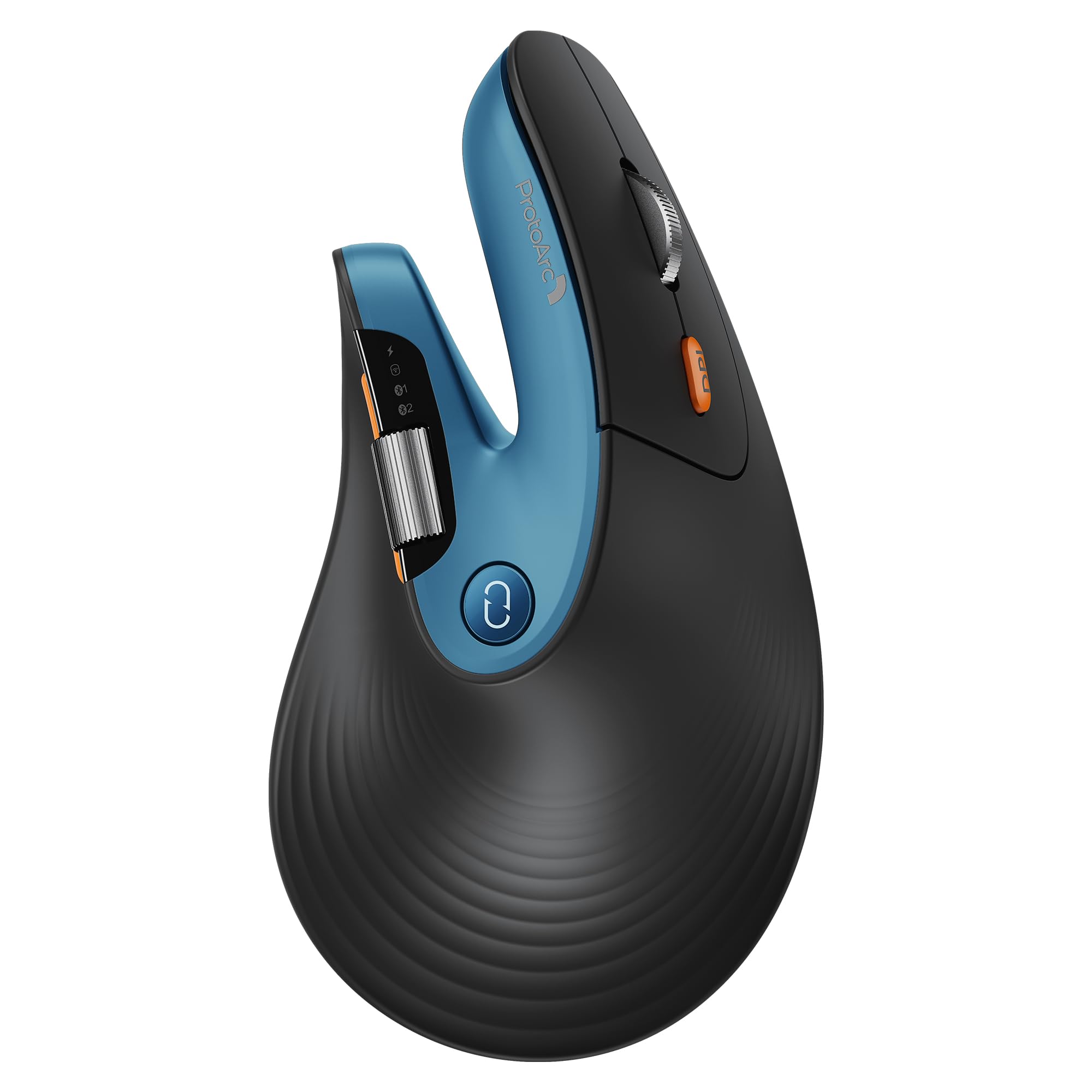
ProtoArc Mice
ProtoArc EM11 Pro Ergonomic Mouse for Large Hands, Side Scroll, Black Blue
In stock Sold by ProtoArc Fulfilled by Amazon Free shipping
Last price we saw on Amazon
$44.99
List price $52.99-15%You save $8.00
No score yet
We've only just started checking this product's price. Its Deal Score appears after a few more checks.
The price may have changed. We last checked it over 24 hours ago, so confirm it on Amazon.
Price checked Nov 13, 2026, 5:15 AM ET. Prices and availability can change.
We may earn a commission if you buy. It never changes the price you pay.
Product overview
Sold byProtoArc
FulfilmentFulfilled by Amazon
ShippingFree shipping
BrandProtoArc
CategoryMice
Key features
- Perfect Fit for Large Hands: Designed for hand lengths of 19.0–21.5 cm (7.5–8.5""), the larger contoured shape gives your palm more complete support instead of forcing your fingers into a cramped grip. The vertical design keeps your hand and forearm in a more natural position, making it easier to stay comfortable through long hours of emails, spreadsheets, meetings, and everyday office work. For the best fit, please measure your hand before ordering
- Horizontal Scrolling Made for Spreadsheets & Wide Workspaces: The side scroll wheel lets your thumb move smoothly left and right without dragging the bottom scroll bar. When working in wide Excel sheets, financial reports, timelines, editing software, or large design canvases, you can move across columns and content faster while keeping your hand in place—helping reduce repetitive cursor movement and making daily navigation feel more efficient
- Browser-Based Button Customization: No software download or installation required. Use the browser-based customization tool to configure 6 buttons, adjust DPI, and assign frequently used commands such as copy, paste or other shortcuts. Whether you spend your day processing documents, managing spreadsheets, browsing webpages, or switching between repetitive tasks, commonly used actions can stay closer to your fingertips. The side scroll wheel can also be customized
- Ergonomic Vertical Design for Long Hours at Your Desk: The vertical shape keeps your wrist and forearm in a natural handshake position, reducing twisting and strain compared to traditional flat mice. Ideal for long work sessions in home or corporate offices. Please note: First-time users should keep their palm relaxed and allow 1–2 weeks for their muscles to adapt and develop a natural grip.
Show all 8 featuresShow fewer
- Switch Between 3 Devices Without Switching Mice: Connect up to three devices through two Bluetooth 5.0 channels and one 2.4 GHz USB-A receiver. Move from your work laptop to a personal computer or tablet with a simple device switch instead of reconnecting or keeping multiple mice on your desk. Ideal for hybrid workers, dual-computer setups, and home offices where multiple devices are used throughout the day. Compatible with Windows 8/10 or later, macOS 10.12 or later, and Android 4.3 or later
- Adjustable up to 7200 DPI for Different Work Tasks: Choose the cursor speed and precision that fits the task, with adjustable sensitivity up to 7200 DPI. Use a lower setting when precise control matters, then increase the DPI when moving quickly across large monitors or multi-screen workspaces. Combined with forward and back buttons, it helps make browsing, document review, spreadsheet work, and everyday multitasking faster and more intuitive
- Rechargeable Battery for a Cleaner Desktop Setup: A built-in 500mAh rechargeable lithium-ion battery eliminates the need to regularly replace disposable batteries. Simply recharge the mouse with the included USB Type-C cable, making it more convenient for everyday desk use and helping keep spare batteries out of your workspace. Please note that the included Type-C cable is for charging only
- Give Yourself 1-2 Weeks to Adjust: Switching to a vertical mouse changes your hand position, so the grip may feel unfamiliar at first. We recommend using it consistently for 1–2 weeks while keeping your hand relaxed. Once your muscles adapt to the shape, navigation becomes natural, and you can fully enjoy the wrist pain relief our ergonomic design provides
Specifications
| Brand | ProtoArc |
|---|---|
| Color | Black Blue |
| Connectivity Technology | Bluetooth, USB |
| Special Feature | Ergonomic Design, Multi-Device, Programmable Buttons, Rechargeable, Wireless |
| Movement Detection Technology | Optical |
| Additional Features | Ergonomic Design, Multi-Device, Programmable Buttons, Rechargeable, Wireless |
| Movement Detection | Optical |
| Button Quantity | 8 |
| Hand Orientation | Right |
| Compatible Devices | Personal Computer, Tablet |
| Operating System | Android 4.3 or higher, Mac OS X 10.12 or higher, Windows 8, Windows 10 or higher |
| Number of Batteries | 1 Nonstandard Battery batteries required. (included) |
Other versions of this product
Other sizes, colours, models and bundles, with today's price.
 ProtoArc EM11 Pro Ergonomic Mouse for Large Hands, Side Scroll, Black
$35.62
 ProtoArc EM11 Pro Ergonomic Mouse for Large Hands, Side Scroll, White
$44.99
 ProtoArc EM11 Pro Ergonomic Mouse for Large Hands, Side Scroll, Blue
$41.99
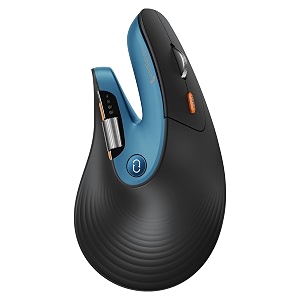 ProtoArc EM11 Pro Ergonomic Mouse for Large Hands, Side Scroll, Black Blue
$44.99
You're viewing this