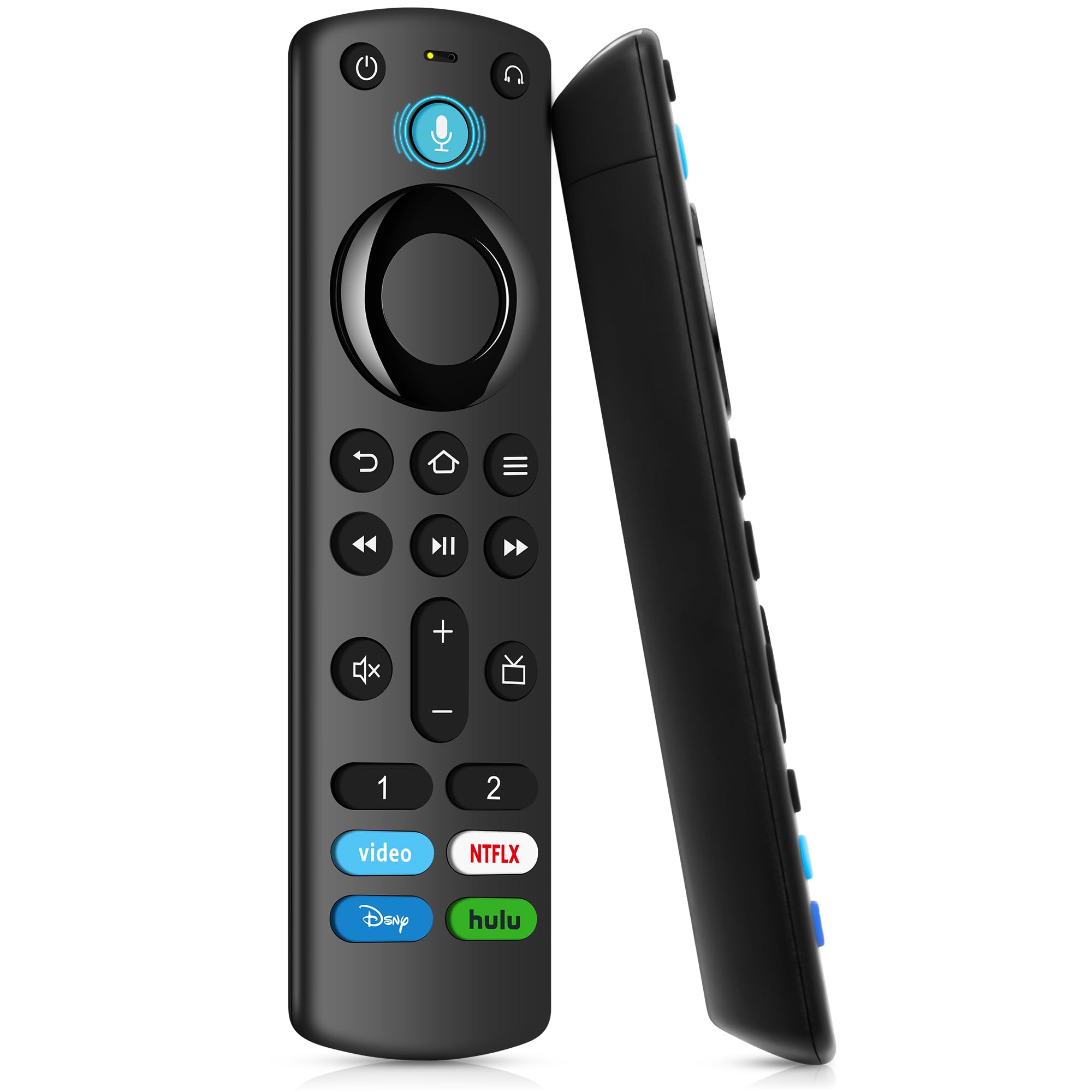
TGHCP Remote Controls
Voice Fire Stick Remote Fit for All Fire-Series TV Cube/FireStick, Compatible with Fire Stick 4K Max/4K, FireStick TV Stick/FireStickLite/HD, and Fit for Omni Series, Insignia/TCL/Pioneer Smart TV
In stock Sold by TGHCP Fulfilled by Amazon Free shipping
Last price we saw on Amazon
$9.99
No score yet
We've only just started checking this product's price. Its Deal Score appears after a few more checks.
The price may have changed. We last checked it over 24 hours ago, so confirm it on Amazon.
Price checked Nov 9, 2026, 9:03 PM ET. Prices and availability can change.
We may earn a commission if you buy. It never changes the price you pay.
Product overview
Sold byTGHCP
FulfilmentFulfilled by Amazon
ShippingFree shipping
BrandTGHCP
CategoryRemote Controls
Key features
- Compatible with: Smart TVs Cube (1st / 2nd / 3rd Gen), Smart TVs Stick 4K Max (1st / 2nd Gen), Smart TVs Stick 4K (1st / 2nd Gen), Smart TVs Stick (2nd / 3rd Gen), Smart TVs Stick Lite, TV Stick HD, Smart TVs (3rd Gen), Great fit for Insignia, Toshiba, Pioneer, Omni Series, Omni QLED Series, 4-Series, Not for Roku, Not for Samsung
- Customizable Buttons: With 4 shortcut buttons and 2 customizable buttons, Just press and hold [1] or [2] to program customizable buttons, you can create your own shortcuts to favorite channels, apps, or any commands, and a new shortcut to the on-screen BT menu that lets you pair your wireless headphones fast
- Not Compatible: This remote control can not compatible with Smart TVs (1st and 2nd Gen), Smart TVs Stick (1st Gen), or Smart TVs Edition smart TVs, if your product doesn't work, please send your message to us, we must give you the best solution in the end
- With Voice Function: You can ask it to find your favorite content, Quickly jump to your favorite scenes with standard navigation and playback controls, Preset 4 app button shortcuts, Quick access to your favorite content
Show all 5 featuresShow fewer
- How to Pair:First you need to remove stick from TV and power from stick. Then reattach power and stick back in TV. Then Press the Home button about 10-15 seconds until the LED indicator starts to rapidly flash amber for 10 seconds, then your remote will automatically pair with your device
Specifications
| Brand | TGHCP |
|---|---|
| Special Feature | Voice Search |
| Color | Black |
| Max Number of Supported Devices | 1 |
| Compatible Devices | Television |
| Additional Features | Voice Search |
| Maximum Number of Supported Devices | 1 |
| Connectivity Technology | Infrared |
| Button Quantity | 6 |
| Controller Type | Button Control |
| Maximum Range | 10 feet |
| Warranty Description | 1 year |
Other versions of this product
Other sizes, colours, models and bundles, with today's price.
 Replacement Voice Remote Control LED LCD HD UHD 4K HDR SmartCast Smart TVs0-50st
$9.99
 Replacement Fire Stick Remote Fit for All FireStick Remote, Fire Smart TV Cube/FireStick 4K Max/Fire Stick 4K, FireStick (2nd/3rd Gen)/Lite/HD, Insignia/TCL/Hisense Smart TVs
$8.99
 Voice Fire Stick Remote Fit for All Fire-Series TV Cube/FireStick, Compatible with Fire Stick 4K Max/4K, FireStick TV Stick/FireStickLite/HD, and Fit for Omni Series, Insignia/TCL/Pioneer Smart TV
$9.99
You're viewing this
 Replacement Fire Stick Remote Fit for All FireStick Remote, Fire Smart TV Cube/FireStick 4K Max/Fire Stick 4K, FireStick (2nd/3rd Gen)/Lite/HD, Insignia/TCL/Hisense Smart TVs
$6.99